How to Use walk() in R
Introduction
The walk() function is purrr’s tool for side effects — things like saving files, printing to the console, or writing plots to disk. Unlike map(), which is built to collect and return results, walk() is built to do something with each element and return the original input invisibly.
When to use walk():
- Save many plots or files
- Print formatted output for each element
- Send notifications, log messages, or API calls
- Anything where the action matters more than the return value
walk() vs map()
The difference is what they return. map() returns a list of results; walk() returns the input invisibly so it disappears from the console but stays in the pipe.
| Function | Returns | Use For |
|---|---|---|
map() |
List of results | Transformations |
walk() |
Input (invisibly) | Side effects |
Getting Started
library(tidyverse)Basic walk(): Print Each Element
The simplest use is printing or messaging each element of a list:
fruits <- c("apple", "banana", "cherry")

walk(fruits, \(f) message("Found fruit: ", f))
This prints three messages but returns nothing visible. Compare with map():
# map() shows the return value (NULL three times)
map(fruits, \(f) message("Found: ", f))
# [[1]] NULL
# [[2]] NULL
# [[3]] NULL
walk() keeps your console clean.
Practical Example: Save Multiple Plots
This is the most common use of walk() — looping over groups and saving one plot per group.
Set up plot data
library(palmerpenguins)

species_list <- penguins |>
  drop_na() |>
  split(~species)
split() gives you a named list with one data frame per species.
Build a plot function
save_species_plot <- function(data, name) {
  p <- ggplot(data, aes(bill_length_mm, body_mass_g)) +
    geom_point() +
    labs(title = name)

  ggsave(paste0(name, ".png"), p, width = 6, height = 4)
}
The function does the actual work — creating and saving one plot.
Walk over the list
Use iwalk() (indexed walk) to get both the value and its name:
iwalk(species_list, save_species_plot)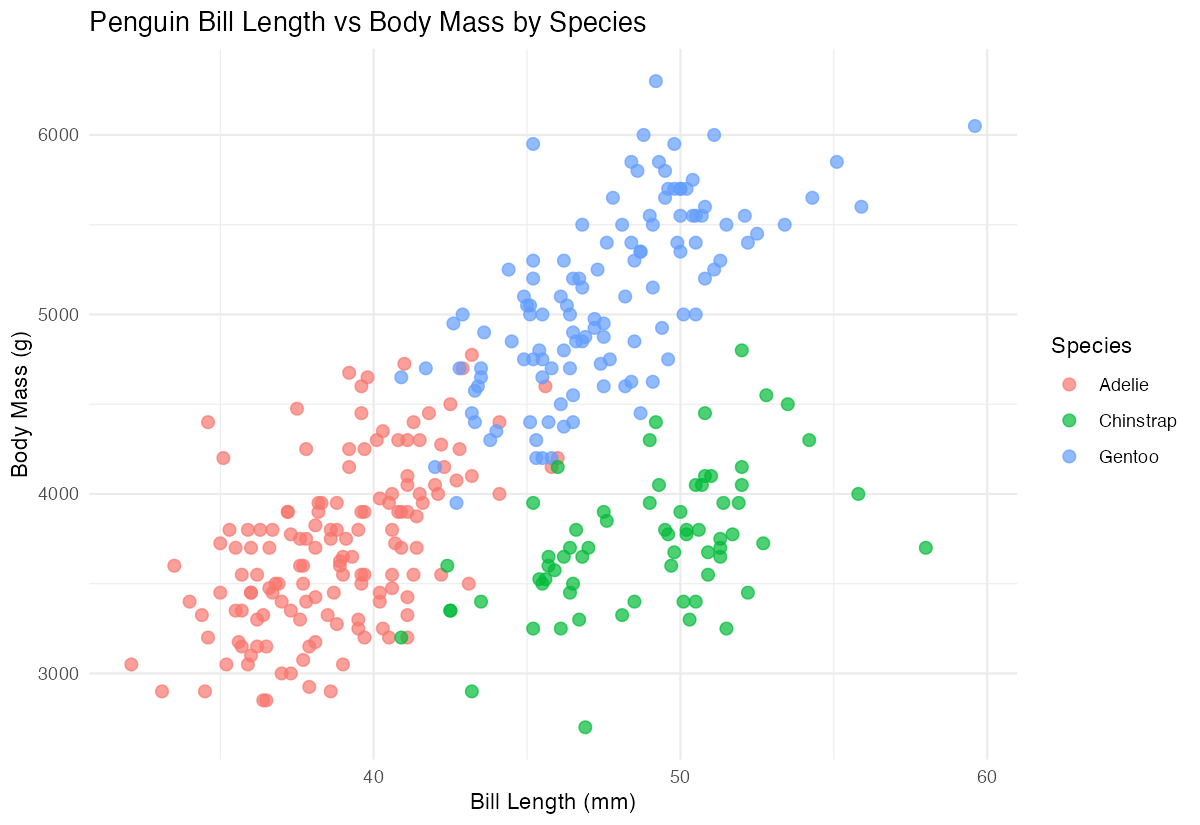
You now have Adelie.png, Chinstrap.png, and Gentoo.png saved to disk. No list of NULL return values clutters your output.
walk2(): Two Inputs in Parallel
When you need to walk over two parallel vectors, use walk2():
files <- c("a.csv", "b.csv", "c.csv")
data_list <- list(mtcars, iris, airquality)

walk2(data_list, files, write_csv)
This writes each data frame to its matching file. The arguments map directly: walk2(.x, .y, .f) calls .f(.x, .y).
pwalk(): Many Inputs
For three or more parallel inputs, use pwalk() with a list of arguments:
plots_to_make <- tibble(
  data = list(mtcars, iris),
  filename = c("mtcars.png", "iris.png"),
  width = c(6, 8)
)

pwalk(plots_to_make, function(data, filename, width) {
  p <- ggplot(data, aes(.data[[names(data)[1]]])) + geom_histogram()
  ggsave(filename, p, width = width, height = 4)
})
The argument names in your function must match the column names of the tibble. This pattern is great for “table-driven” workflows where each row describes one task.
iwalk(): Walk with Index or Name
iwalk() passes both the value and its name (or index) to your function. It’s perfect when you need to label output by group.
groups <- list(small = 1:3, medium = 1:6, large = 1:10)

iwalk(groups, \(values, name) {
  message(name, " has ", length(values), " items")
})
# small has 3 items
# medium has 6 items
# large has 10 items
If the list has no names, the second argument is the position index instead.
walk() Returns Its Input
A subtle but powerful feature: walk() returns its input invisibly, so you can use it in the middle of a pipeline without breaking the chain.
penguins |>
  drop_na() |>
  split(~species) |>
  walk(\(d) message("Processing ", nrow(d), " rows")) |>
  map(\(d) lm(body_mass_g ~ bill_length_mm, data = d))
The walk() step prints progress messages, then hands the original list straight to map(). You get logging without forking your pipeline into a separate variable.
Practical Example: Logging Progress
For long-running operations, use walk() (or iwalk()) to log progress to the console.
files <- list.files("data/", pattern = "\\.csv$", full.names = TRUE)

iwalk(files, \(file, i) {
  message("[", i, "/", length(files), "] Reading ", basename(file))
  read_csv(file)
})
The downside: this drops the data because walk() returns the input. If you need both progress and the data, use imap() instead — it returns a list and you can message() inside it.
Send API Calls
Another good fit: firing off API calls or webhooks where you only care that they succeed.
user_ids <- c(101, 202, 303)

walk(user_ids, \(id) {
  request("https://api.example.com/notify") |>
    req_body_json(list(user_id = id)) |>
    req_perform()
})
You don’t need a list of HTTP responses — you just want the side effect of each request being made.
Common Mistakes
1. Using walk() when you need the results
If you actually need to keep what each iteration produced, use map():
# Wrong - results are thrown away
walk(files, read_csv)

# Right - keep the data frames
data_list <- map(files, read_csv)
2. Forgetting walk() returns the input, not your function’s result
# Returns the original numbers, not the messages
result <- walk(1:3, \(x) message("Value: ", x))

result
# [1] 1 2 3
This is intentional — but surprising the first time.
3. Reaching for a for loop
for loops work, but walk() keeps your code consistent with the rest of a tidyverse pipeline and makes it easy to switch to parallel iteration later (with furrr::future_walk()).
Summary
| Function | Inputs | Use When |
|---|---|---|
walk() |
One list | Side effect on each element |
walk2() |
Two parallel lists | Side effect with paired args |
pwalk() |
Many parallel lists | Side effect with 3+ args |
iwalk() |
One list + index/name | Side effect that needs labels |
Key points:
- Use
walk()when the action matters, not the return value - It returns its input invisibly, so it’s pipeline-friendly
- Use
iwalk()to access names when saving named files - Use
walk2()andpwalk()for parallel inputs