How to use geom_label() in R
Introduction
The geom_label() function in ggplot2 creates text labels with a rectangular background, making them stand out clearly on plots. Unlike geom_text(), these labels have a solid background that improves readability, especially when text overlaps with data points or complex backgrounds.
Getting Started
library(tidyverse)
library(palmerpenguins)
Example 1: Basic Usage
The Problem
We want to add clear, readable labels to highlight specific data points on a scatter plot. Regular text can be hard to read when it overlaps with plot elements.
Step 1: Create a basic scatter plot
Let’s start with a simple plot showing the relationship between penguin bill length and depth.
p1 <- penguins |>
  ggplot(aes(x = bill_length_mm, y = bill_depth_mm)) +
  geom_point(alpha = 0.7)

p1
This creates our foundation scatter plot with all penguin measurements plotted as points.
Step 2: Add basic labels
Now we’ll add labels to identify different penguin species using geom_label().
p1 +
  geom_label(aes(label = species),
            alpha = 0.8,
            size = 3)
The labels now appear with white backgrounds, making them clearly readable against any background elements.
Step 3: Customize label appearance
We can improve the labels by adjusting colors and positioning.
penguins |>
  ggplot(aes(x = bill_length_mm, y = bill_depth_mm)) +
  geom_point(alpha = 0.5) +
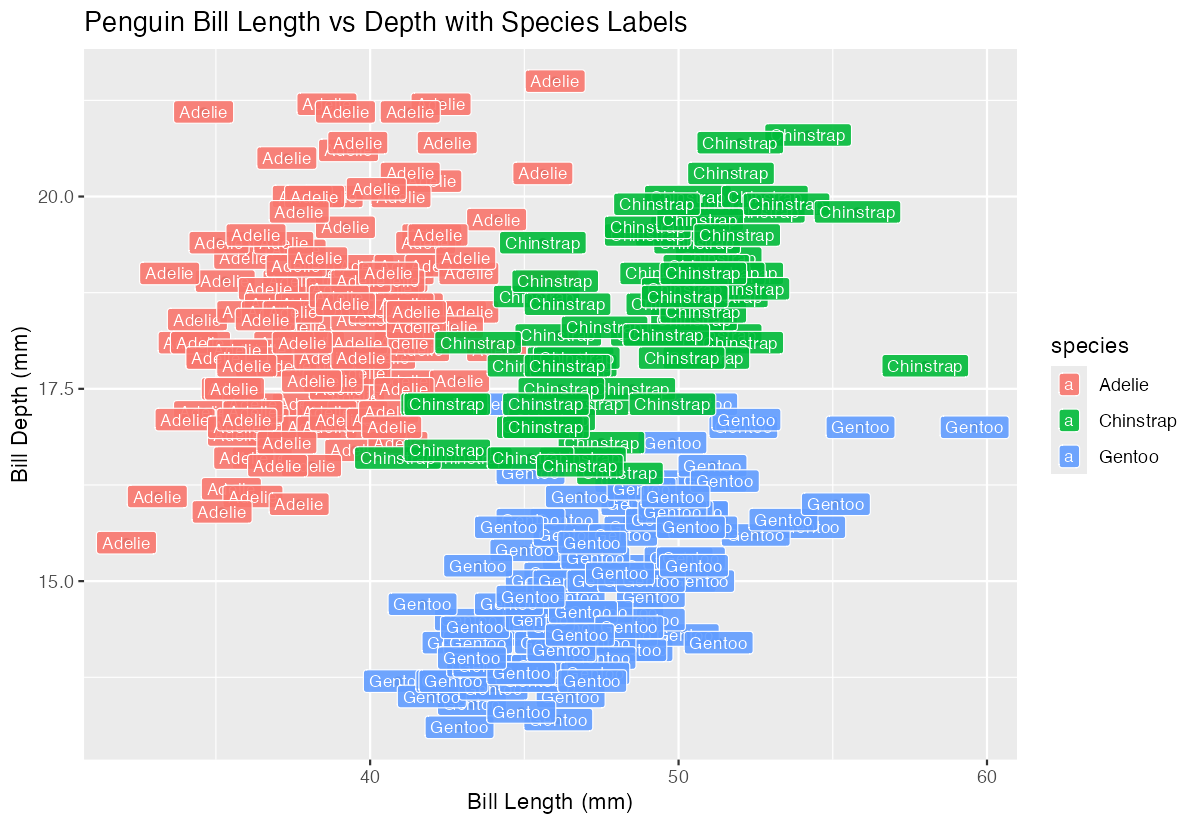
  geom_label(aes(label = species, fill = species),
            color = "white",
            size = 3,
            alpha = 0.9)
Now each species has its own colored background with white text for better contrast.
Example 2: Practical Application
The Problem
We need to create a summary visualization showing average bill measurements by species, with clearly labeled data points. This is common when presenting findings to stakeholders who need to quickly identify key values.
Step 1: Calculate species averages
First, let’s compute the mean bill measurements for each penguin species.
penguin_summary <- penguins |>
  group_by(species) |>
  summarise(
    avg_length = mean(bill_length_mm, na.rm = TRUE),
    avg_depth = mean(bill_depth_mm, na.rm = TRUE),
    .groups = 'drop'
  )

penguin_summary
This gives us clean summary data with average measurements for each species.
Step 2: Create the base visualization
Now we’ll plot these averages as distinct points for each species.
p2 <- penguin_summary |>
  ggplot(aes(x = avg_length, y = avg_depth, color = species)) +
  geom_point(size = 4) +
  theme_minimal()

p2
We have a clean plot showing the three species as colored points representing their average measurements.
Step 3: Add informative labels with values
Let’s add labels that show both the species name and the exact measurements.
penguin_summary |>
  mutate(label_text = paste0(species, "\n(",
                            round(avg_length, 1), "mm, ",
                            round(avg_depth, 1), "mm)")) |>
  ggplot(aes(x = avg_length, y = avg_depth)) +
  geom_point(aes(color = species), size = 4) +
  geom_label(aes(label = label_text, fill = species),
            color = "white",
            size = 3.5,
            nudge_y = 0.5) +
  theme_minimal()
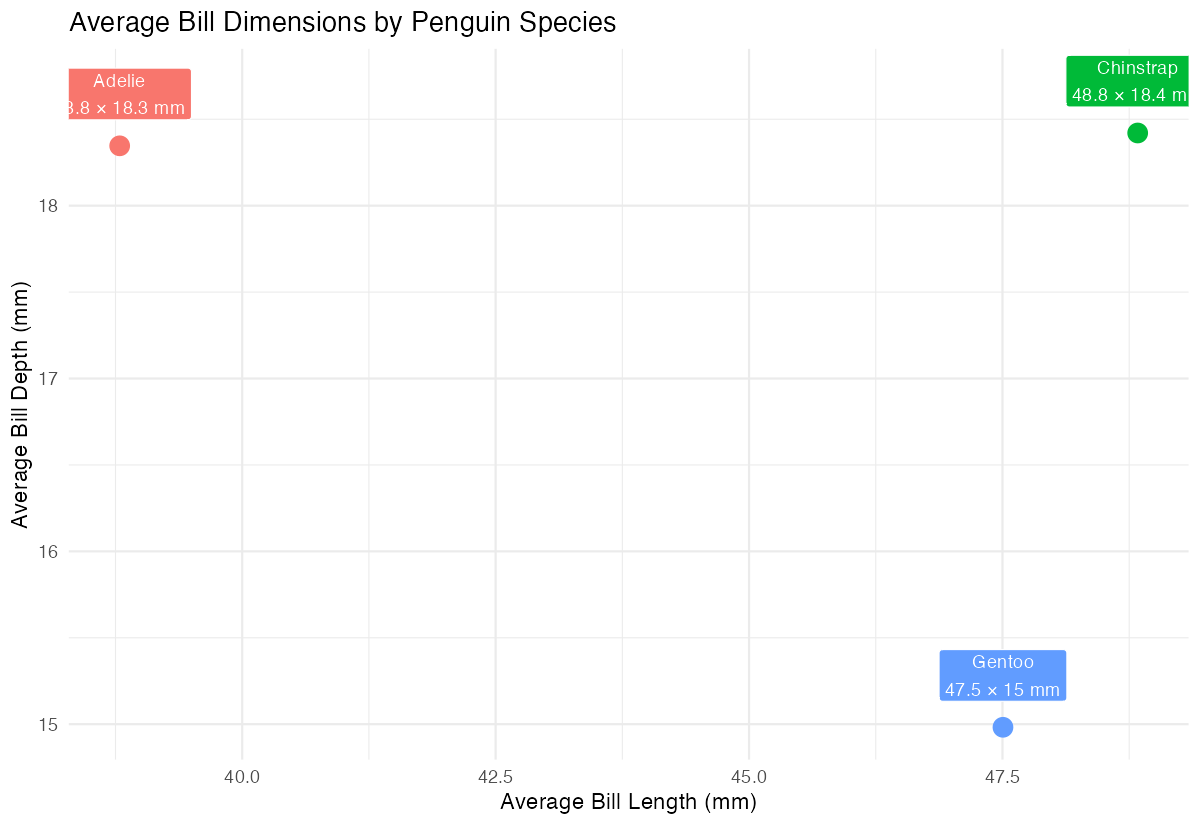
The labels now display species names with exact measurements, positioned slightly above each point for clarity.
Step 4: Polish the final visualization
Finally, let’s add proper titles and remove the legend since labels provide the information.
penguin_summary |>
  mutate(label_text = paste0(species, "\n",
                            round(avg_length, 1), " × ",
                            round(avg_depth, 1), " mm")) |>
  ggplot(aes(x = avg_length, y = avg_depth)) +
  geom_point(aes(color = species), size = 4) +
  geom_label(aes(label = label_text, fill = species),
            color = "white", size = 3.2, nudge_y = 0.3) +
  labs(title = "Average Bill Dimensions by Penguin Species",
       x = "Average Bill Length (mm)",
       y = "Average Bill Depth (mm)") +
  theme_minimal() +
  theme(legend.position = "none")
This creates a publication-ready visualization with clear, informative labels that eliminate the need for a separate legend.
Summary
geom_label()creates text labels with solid backgrounds for improved readability- Use
aes(label = column_name)to specify which data to display in labels
- Customize appearance with
fill,color,size, andalphaparameters - Use
nudge_xandnudge_yto position labels away from overlapping elements Combine with
paste0()to create multi-line or formatted label text